Scale-Aware Detail and Simplification
A line-art detail earns its place by surviving the intended viewing scale and preserving the design's purpose.

That decision becomes less obvious when a monogram, badge, sign, plaque, or gift graphic is reduced. A thin interior mark may merge with its neighbor. A narrow counter may close. A bridge may lose its role. A contour can remain technically present while becoming difficult to recognize.
Which details still communicate the intended shape, which can be simplified, and which changes need shop confirmation?
This page focuses on that decision before vector cleanup and production discussion. A clean path view shows an edited vector state. It does not establish successful cutting, engraving, printing, tracing, or fabrication.
More specific pages
These pages continue the topic in smaller, more specific directions.
What Scale-Aware Simplification Decides
Line art simplification reduces visual or geometric complexity for a chosen scale. In vector work, that may involve reducing anchor points, nodes, segments, or line density while reviewing the resulting contour.
The target scale changes the answer. A detail that reads clearly in a large concept preview may become secondary at the final size. Another may appear minor when enlarged but carry the recognition of a letter, animal, emblem, or object when reduced.
Use three working states:
- Retain: The detail carries recognition, structure, or separation at the intended scale.
- Simplify: The detail can use fewer points or a clearer contour without losing its role.
- Inspect or route: The change affects a gap, counter, bridge, edge, layer, or closed region and needs closer review before handoff.
A path with many nodes may be harder to inspect and revise. Fewer nodes do not automatically produce better or more legible line art. Compare the simplified contour at the scale where the artwork will be judged.
Start With the Intended Scale
Large zoom can hide the problem you are trying to find.
At high magnification, small bends and narrow gaps appear easy to distinguish. At the intended viewing or production scale, those features may visually combine. Research on scale-dependent line drawing supports treating scale as a meaningful condition for simplification, but it does not establish a universal threshold for every artwork, material, machine, or process.
Record the target context before editing:
- Approximate finished dimensions.
- Whether the design will be seen close up or from a normal viewing distance.
- Whether it is single-color, layered, outlined, or region-based.
- Which details are essential to recognition.
- Which dimensions, gaps, or separations remain shop-dependent.
- Whether the current file is a concept preview, working vector, proof, or approved production file.
Compare the original and simplified versions at the same scale. An enlarged inspection view can explain why a contour changed, but it should not replace the target-scale review.
Triage Detail by Its Visible Role
Small line art often contains more marks than the final design needs. Classify each detail by function rather than appearance alone.
Recognition Details
These establish what the viewer sees. They may define a letterform, facial feature, silhouette, emblem, handle, fold, or distinctive bend.
When a recognition detail disappears, the graphic may remain attractive but lose its intended subject. Retain it unless a clearer substitute preserves the same role.
Structural Details
These show how parts relate. A crossing, bridge, counter, opening, overlap, or closed region may explain the design's construction.
Simplifying a structural detail can change whether a region appears open or closed, whether two parts seem connected, or whether a letter remains readable.
Texture Details
Hatching, repeated marks, surface lines, and secondary rhythm often become candidates for reduction when the main silhouette and structure remain clear.
Texture can also create density. A crowded area may need fewer marks even when each individual line is carefully drawn.
Decorative Details
Decorative marks support style but may not carry the subject. They can often be simplified, grouped, or removed when they compete with recognition and structure.
That is a design decision, not an automatic consequence of using a simplification command.
Compare Contours Before and After Editing
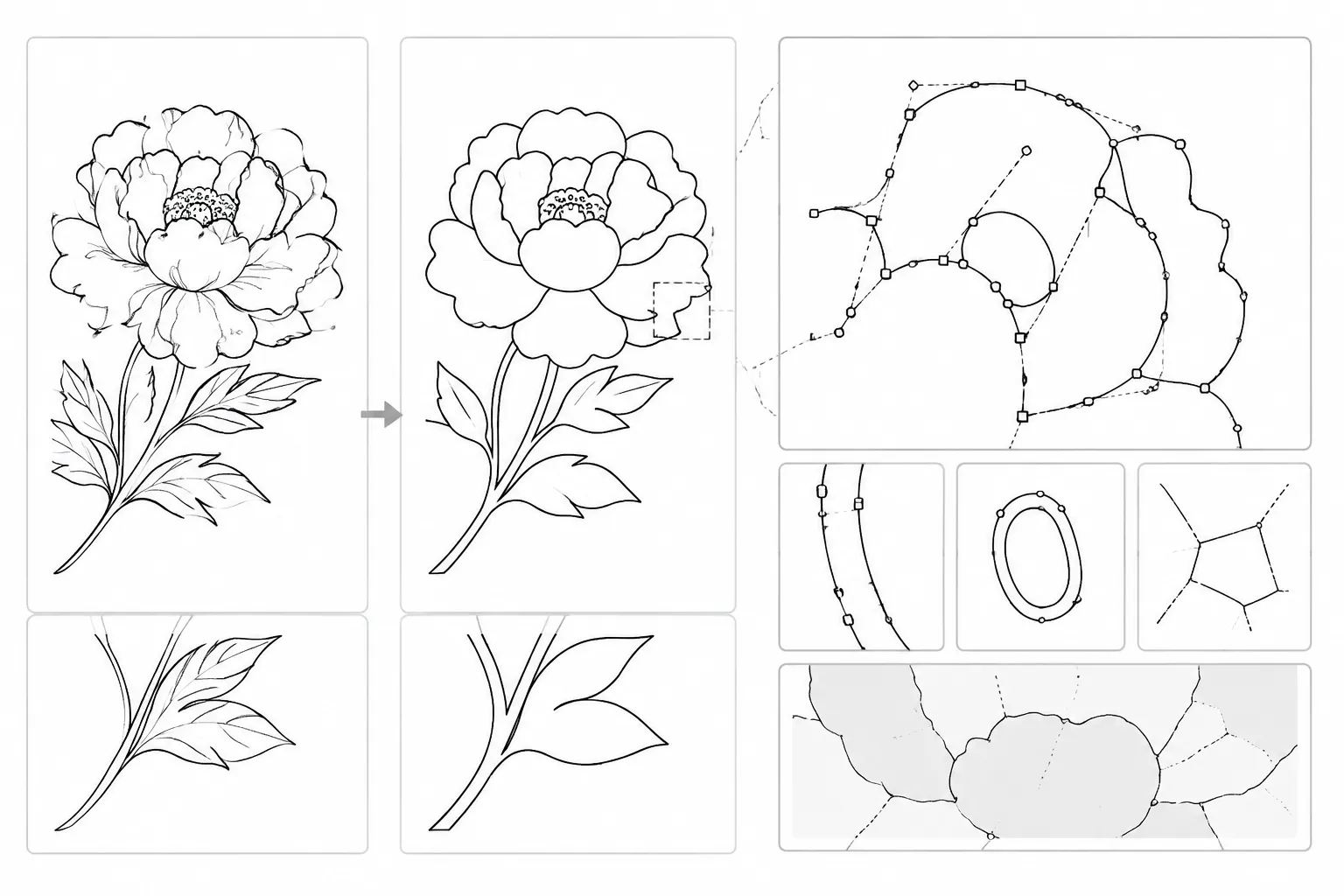
A useful line-art shop-handoff review shows an original contour and a simplified contour together.
Inspect five visible changes:
- Bends: Did a smooth turn become angular, flattened, or overly broad?
- Edges: Did the outer silhouette shift enough to change the object's identity?
- Gaps: Did a narrow opening become smaller, disappear, or merge with a neighboring stroke?
- Counters: Did an interior opening in a letter, badge, or symbol become crowded or closed?
- Bridges: Did a connecting section become weak, disconnected, or visually ambiguous?
The path view indicates how the vector geometry was edited. It does not establish how a particular machine or material will respond. Keep those questions separate in the handoff record.
A practical comparison uses three views:
- The original artwork at target scale.
- The simplified artwork at target scale.
- An enlarged path view showing changed nodes, curves, and region boundaries.
The first view tests communication. The second tests the proposed result. The third helps explain the edit.
Reduce Nodes Without Losing the Path Shape
“Reducing anchor points” and “reducing path nodes” describe editing operations, not quality outcomes.
A dense contour may contain repeated points that do not visibly improve its shape. Removing or consolidating them can make the path easier to inspect. A local point may also control a meaningful corner, taper, inflection, or transition.
Preserve the Main Contour First
Identify the outer silhouette or principal stroke before touching minor interior marks. The main contour usually carries the strongest recognition signal.
If the silhouette changes noticeably, pause and compare the original. A smaller node count is not enough reason to accept a changed identity.
Simplify Secondary Curves Next
Review interior curves, decorative loops, and repeated texture marks after the primary shape is stable.
Compare their spacing and rhythm. A simplified curve may remain close to the original while producing a visibly different balance within the design.
Recheck Connected Structure
Inspect intersections, bridges, counters, and closed regions after each meaningful edit. Simplifying one path can affect how nearby paths appear to relate, even when those paths were not directly edited.
Research on line-drawing simplification treats continuity, perceptual grouping, and region relationships as relevant concerns. That supports these review categories, but not a universal acceptance rule for production.
Density Can Matter More Than Detail Count
A design may contain individually reasonable marks that become confusing when viewed together.
Dense clusters deserve a separate review because the issue may be the relationship between lines rather than any single contour. Parallel strokes, close hatching, repeated borders, or layered outlines can lose separation at a smaller scale.
Compare the area as a whole:
- Does the cluster still read as one intended feature?
- Do adjacent lines remain visually distinct?
- Has a gap become a dark pocket?
- Does one layer overpower another?
- Does the simplified version create an unintended solid shape?
- Are the most important edges still easy to identify?
Line-drawing research describes grouping and density reduction as scale-dependent tasks. Here, that becomes a practical editorial check: inspect the cluster at the intended scale and record the visible change.
Do not turn density review into a fixed numeric rule. The supplied material does not establish universal line spacing, stroke width, bridge size, or gap thresholds.
Closed Regions, Counters, and Bridges
Some line-art problems concern whether regions remain open, closed, connected, or visually separated rather than whether a contour closely follows the original.
A counter is an interior opening. It may appear in a letter, badge, symbol, or enclosed object detail. If simplification narrows or closes it, recognition can change.
A bridge is a connecting section between larger parts. If it becomes visually weak or loses continuity after editing, the relationship between those parts may become unclear.
A closed region is an area bounded by surrounding paths. Region-aware research supports checking these relationships during simplification. Inspect region structure alongside the path shape.
For each affected region, document:
- Original state: Open, closed, connected, or separated.
- Simplified state: What visibly changed.
- Intended role: Recognition, structure, texture, or decoration.
- Decision: Retain, revise, or route for shop review.
- Unresolved dependency: Artwork choice, material question, machine question, or approval question.
This makes the handoff more useful than a note that simply says “cleaned up.”
Two Viable Simplification Strategies
There is no context-free winner between retaining more detail and simplifying more aggressively. The choice depends on what the artwork must communicate at its intended scale.
Retain More Detail
This approach preserves subtle bends, interior marks, and secondary structure.
It may suit a larger graphic, a close-view emblem, or artwork where secondary detail carries meaning. The tradeoff is greater visual density and potentially more editing work.
Review whether the retained details remain distinct rather than competing with the main contour.
Simplify More Strongly
This approach favors fewer marks, clearer separation, and a more legible overall silhouette.
It may suit a small badge, compact monogram, or single-color concept where visual grouping matters more than fine texture. The tradeoff is that simplification can erase a distinctive bend, change a counter, or weaken a structural connection.
Review whether the simplified version still communicates the same subject and relationships.
When the choice remains unresolved, include both versions in the handoff. Label one as the retained-detail option and the other as the simplified option. Request approval on the visible difference before further cleanup.
Common Misunderstandings
“Fewer nodes mean a better file.”
Fewer nodes may make a contour easier to inspect or edit. They may also alter a meaningful curve or remove a local feature. Judge the shape and role of the detail, not the node count alone.
“The enlarged path looks clean, so the artwork is ready.”
A clean path view shows an edited vector state. It does not prove that the artwork communicates at the target scale or that a particular process will accept it.
Keep concept approval, vector cleanup, shop review, and production approval as separate states.
“One simplification setting will work everywhere.”
The research supports scale-dependent comparison, not one universal setting. Different artwork structures can require different choices even when finished dimensions are similar.
Use a setting to create a comparison version. Then inspect the result and record what changed.
“A mockup proves the physical result.”
A plaque, sign, or gift-product mockup can show composition and intended context. It is not a test-piece record.
Do not use a mockup to establish material behavior, machine readiness, ventilation adequacy, or final output quality.
“The software manual confirms production suitability.”
Adobe Illustrator documentation and the Inkscape manual can define paths, nodes, and editing workflows. They do not approve a particular file for a shop, machine, material, or final product.
A Handoff Review That Keeps Decisions Visible
Before routing the artwork, prepare a compact comparison record.
Decided Artwork Properties
- Intended finished scale.
- Primary silhouette or contour.
- Essential recognition details.
- Color or layer structure.
- Accepted simplification changes.
- Current file state.
Provisional Simplification Choices
- Removed interior marks.
- Adjusted bends.
- Consolidated curves.
- Changed gaps or counters.
- Altered bridges or closed regions.
- Areas where the original and simplified versions differ visibly.
Shop-Dependent Questions
- Whether the exact material and equipment context changes the artwork decision.
- Whether the shop needs a test piece.
- Which machine-specific preparation steps apply.
- Whether the shop accepts the current path construction.
- Which final production file requirements remain.
- Whether a material, source, or rights question needs separate confirmation.
This separation keeps an edited contour from being mistaken for machine approval. Any rights or commercial-use question belongs with the relevant rights holder or qualified professional, rather than with the vector review.
A Representative Example
Consider a small badge with an outer ring, a central monogram, two narrow counters, and three decorative interior lines.
The original preview shows all three interior lines clearly at a large size. At the intended smaller scale, two lines visually combine with the monogram. The simplification option removes one line and shortens another.
The first decision is not whether the file now has fewer nodes. It is whether the monogram remains recognizable and whether the remaining interior line still supports the badge's structure.
The reviewer compares both versions at target scale, then uses the path view to inspect the shortened contour. One counter is slightly narrower in the simplified version, so that change is recorded as unresolved rather than silently accepted.
The shop receives the selected artwork, the comparison view, and the open question about the counter. Machine, material, and test-piece decisions remain with the relevant shop workflow.
What to Record Before Vector Cleanup
- Target scale: State the intended finished dimensions or viewing condition.
- Keep: Name the silhouette, letterform, emblem, or structural detail that must remain.
- Simplify: Identify marks that may be reduced or grouped.
- Inspect: List bends, edges, gaps, counters, bridges, and regions that changed.
- Compare: Include original and simplified views at the same scale.
- Status: Label the artwork as concept, working vector, proof, or approved file.
- Route: Separate artwork decisions from machine, material, safety, rights, and shop-acceptance questions.
The more visible the unresolved decision, the less likely it is to disappear during handoff. Choose the version whose essential structure remains clear at the intended scale, then route the comparison and open questions for the next owned review.
Sources
These sources support terminology and mechanism-level comparisons for path editing, contour simplification, scale, perception, and region structure. They do not establish universal production thresholds, machine settings, material behavior, or final output quality.
- Adjust path segments
- Simplifying Paths
- Bézier Spline Simplification Using Locally Integrated Error Metrics
- Geometric Clustering for Line Drawing Simplification
- A Novel Evaluation Approach for Line Simplification Algorithms towards Vector Map Visualization
- Region-Aware Simplification and Stylization of 3D Line Drawings
- Perceptual-Aware Sketch Simplification Based on Integrated VGG Layers